

How do you improve an open source CI?


In this article we talk about Drone CI, a very powerful and lightweight open source CI/CD tool, built on Docker, with support for multiple pipelines and multiple platforms. Drone was born in 2012 and, like so many other open source tools, it was built by developers for developers, so it lacked a friendly interface.
Finally, a change...
Drone is used daily in a huge number of projects, and that drove a thorough redesign. After months of work, the new Drone v1.0.0 version was released, and it's now ready to use.
New version

Old version

Analysis of the previous solution
The main goal of the changes was to improve UX first and UI second. Drone's open issues on GitHub were reviewed, and feedback was gathered from developers using it and from the tool's own creator.
From there, a list of the main problems was put together:
- Confusing, unclear navigation
- A confusing cancel-build action
- Lack of user interaction during repository activation
- No responsive design for mobile and tablets
- No clearly defined home page
- Interface scalability problems, with no room for new features
- Unclear settings saving
A list of planned new features was also prepared, including multi-pipeline builds, cron job support, and new repository settings.
New ideas and their implementation
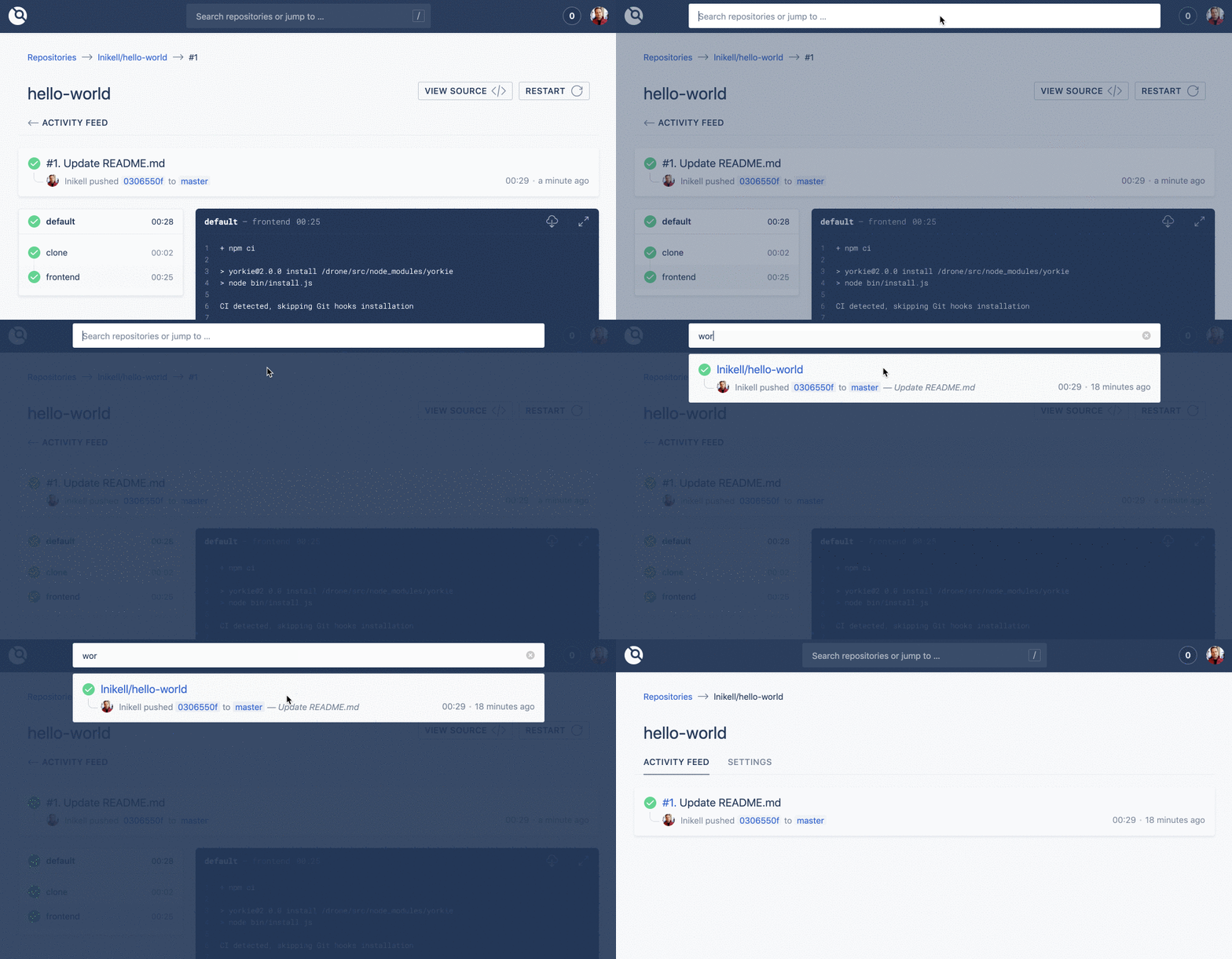
Main navigation: search
To start, "Search" became the key piece for navigating between repositories and activating them. It sits at the top of every page and opens with the "/" shortcut. When you search, you see a repository summary and the status of the latest build.
Cards
Repository cards were designed around the most useful information, aiming for the most flexible solution possible. For example, on the home page the card's title is the repository name, and the second line is a readable sentence with the important information.

That sentence is built from the commit author, the event, the branch, and the commit message. This solution scales better than a table view, where each column maps to a specific field. That way, in the mobile view it can easily collapse and wrap across multiple lines.

Tabs
The repository page now shows tabs as soon as you open it. It's a good way to navigate the settings page, and it allows new tabs to be added in the future (some are already in the works).
A single settings page
Instead of spreading certain settings across different pages, they're now all in one. When you activate a new repository, it takes you straight to the settings page, since that's usually the first thing you do to configure it.

New build page
The idea is to unify components, so the main component, with a brief breakdown of the build status, is the same one used on previous pages. The navigation on the left now supports multiple pipelines. Space was reserved at the top for buttons, where new features are planned to be added in upcoming versions.

Logs matter
To make reading and navigating logs more comfortable, a full-screen mode and a download option were added, which is especially handy if your logs are huge and you want to review them in your favorite editor.
Syncing doesn't block your work
Some Drone users have a huge list of repositories, and syncing all of them takes a while. Previously, syncing took over the whole screen and wouldn't let you close it or keep working with your existing repositories. Now it's simply a small button with an animation while it syncs.
Smart loading
In the new version, when you load data on the first screen and then jump to another page, Drone reuses the existing list and clearly shows that data is loading. No more staring at spinners: if there's data, it's shown instantly.
Nice icons for empty states
A lot of care went into even the empty states, with plenty of different icons you can enjoy across several pages.

What else can we expect from Drone?
Plans are already underway for the Drone 1.1 release, whose key features include:
- A "Deploy" button for a specific environment from the build page
- The ability to filter builds by branches and environments
- Friendly tooltips for people who just installed Drone
- A new approach to real-time updates
- Better user management
