How to build a 2D-to-3D icon converter with Stable Diffusion and Dreambooth


Text-to-image diffusion models have been a major leap forward in AI development, and we're excited to apply them to real projects. The synthesized images will impress you with their "artistic" vision and photorealism. In our field, web design, though, these images are still more of an entertainment than anything else. Only in very specific cases can they end up as illustrations on a page. What we're after is a more predictable result and a systematic, customized approach to generating illustrations for an entire site in one consistent style.
Of course, it's possible to develop your own prompt template that generates varied images with a predictable style (you can see examples here). It's a long and interesting journey in search of the "right" style, but it doesn't always lead to the desired result. The reason is the limited dataset the neural network is trained on. Web design has a lot of niche topics, and the default models are too general for those nuances. Even something as seemingly simple as choosing the look of a button for a landing page reveals just how differently a web designer and a model see the world.
Instead of polishing a prompt, there's a simpler way to channel the AI's overflowing imagination toward a specific area of a graphic task: fine-tuning, i.e. retraining the model on a small set of images. You can add a specific element to the AI's vocabulary, such as your own face (like the popular app Lensa does), an object, or an illustration style: whatever interests you most.

Choosing a style
To train a model on a specific style you need at least 20 different images. While looking for a training dataset, I came across Microsoft's fantastic new Fluent UI emojis and immediately saw they were exactly what I needed. First, because there are tons of images in the same style to experiment with datasets of different sizes (thanks, Microsoft, for releasing all the emojis openly). And second, because this 3D icon style is modern and versatile. As web designers, we could later use it to create new icons or small illustrations on any topic.

On GitHub, the 3D versions of the icons are uploaded at a resolution of 256x256 pixels, which isn't enough for training, so I also upscaled them to 512x512 with SwinIR_4x in the AUTOMATIC 1111 web interface.
Fine-tuning
We did our first fine-tune with Dreambooth on a Stable Diffusion model, since it's currently the simplest and most effective method.
Training demands a lot of computing resources, specifically a very powerful graphics card and a lot of video memory. It also takes a long time: anywhere from several hours to several days. That's why, after several failed attempts, we ruled out training it on a local machine and turned to cloud computing services instead.
I ran the Dreambooth fine-tune on two services, Google Colab and runpod.io, with different settings and dataset sizes.
In the end I got four models:
MS_emoji_v1_30img.ckpt: the first one. A dataset of 30 emojis (trained on Google Colab from the original 4 GB sd-v1-4.ckpt model), with 30 images and 3000 training steps.
MS_emoji_v2_30img: the same dataset of 30 emojis and 3000 training steps. I trained the following models by hand on www.runpod.io (1 x RTX A5000, 8 vCPU, 29 GB RAM), from the original 7.5 GB SD v1-5-pruned.ckpt model prepped for retraining (tutorial). Unlike Colab, runpod lets you supply a REGULARIZATION IMAGES dataset. I never quite understood what it's for; apparently they're images on a specific topic the neural network already knows (because it has already generated them before). But I didn't understand how the network knows it already knows them, so I downloaded the default dataset; since the prompts aren't embedded in the PNGs, I uploaded a dataset of 1000 original Microsoft emojis.

MS_emoji_v3_50img: a dataset of 50 emojis different from the first one. The model was trained for 5000 steps. All the emojis had to be upscaled from 256x256 to 512x512 before training, but with this model I got the folder wrong and trained it with the 256x256 images instead. The model learned that images should look blurry and compressed =)

MS_emoji_v4_850img: the largest dataset, with 850 emojis. I manually removed images that were too complex or too simple, along with all the people and faces, to keep only objects and animals. The model trained for two days (for reference, the others took between 2 and 4 hours).

I also slightly modified the REGULARIZATION IMAGES set: to the previous 1000 emojis I added 370 simple images generated with SD 1.5, which I created specifically with a similar style. It was never clear whether this affected the result.

txt2img tests
I tested how each model generates images with the same seed and the same prompt.


The txt2img tests showed that the models trained on datasets of 30 and 50 images give the best results. On the other hand, the MS_emoji_v4_850img model generated abstract results that rarely showed what was requested.
img2img tests
Stable Diffusion has the great ability to generate images not just from text, but also from an input image with a certain amount of noise applied to it (Denoising strength). Then SD tries to restore the image while taking the entered prompt into account.
Testing the MS_emoji models in img2img produced some very interesting results. Specifically, with low Denoising strength values and using flat illustrations as input, you can get a fairly similar image, but in 3D! With low Denoising strength values, Stable Diffusion tries to reproduce the original image as faithfully as possible, including color. That's why the characteristic purple highlights of the Microsoft emojis (visible in the txt2img versions) disappear at low DS values, even though volume is added quite well.
At high Denoising strength values, the models generate interesting shape variations and the characteristic purple highlight reappears.


Microsoft's Fluent UI dataset on GitHub includes several versions of each image, in 2D and 3D styles. I thought it would be interesting to compare the AI's output with Microsoft's original 3D illustration, by feeding the model the original flat version of the emoji.


The results look good and are quite close to the original 3D images, although they're missing the typical purple highlights of Microsoft's emojis. Even so, we ended up with a versatile 2D-to-3D style converter that stays true to the original color palette.
The models work well for converting flat 2D illustrations with solid fills and no outlines into 3D. The best performer is MS_emoji_v4_850img: it preserves detail and gives excellent results even at a denoising value of 0.5. The generated 3D images resemble the original Microsoft emojis, though without their characteristic purple highlights.
100 icons
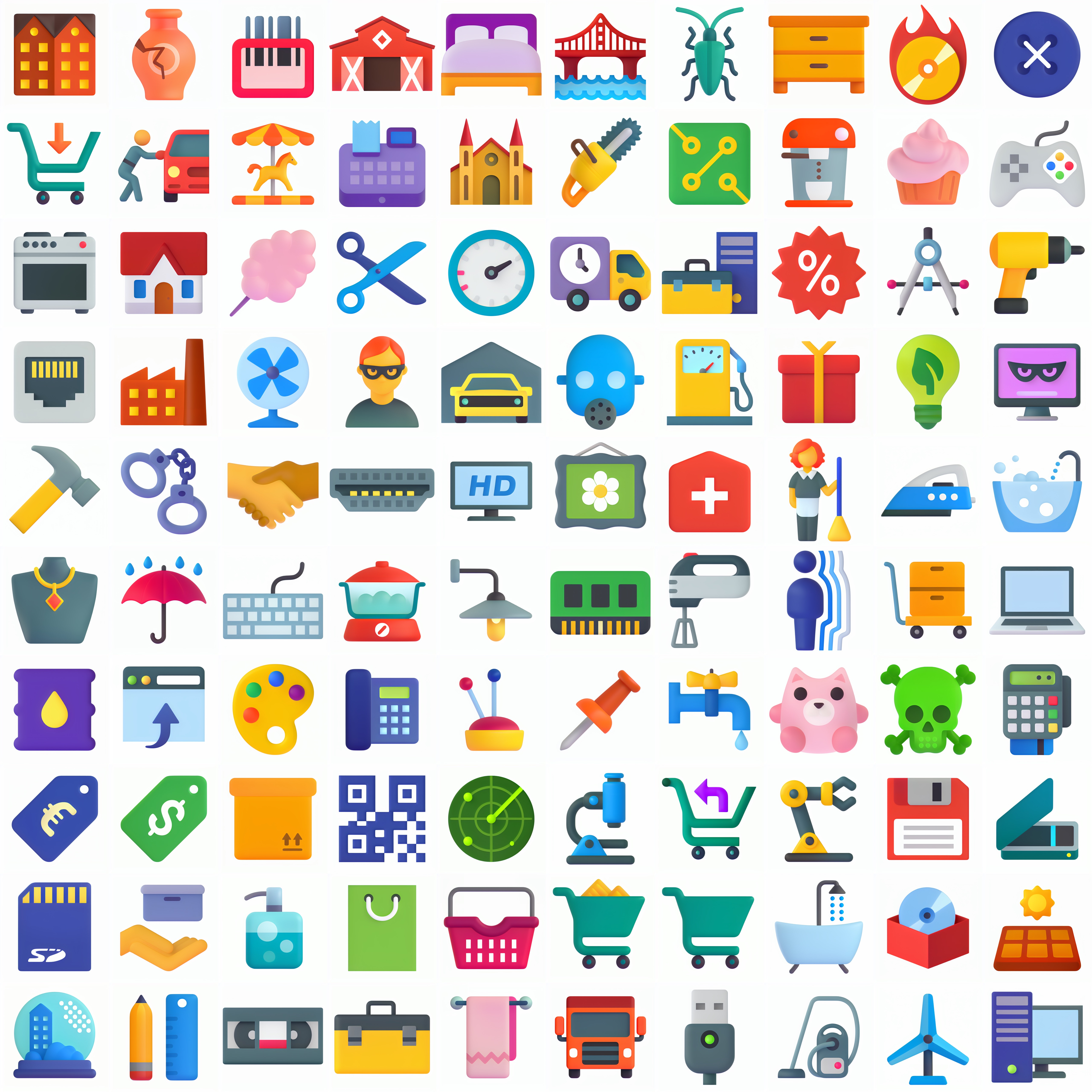
I was curious to try the 2D-to-3D transformation on a larger number of images. I found a pack of 100 flat color 2D icons from icons8.com that matched the style and, using Batch img2img in the AUTOMATIC 1111 web interface, processed all of them with the previous settings.
Results varied depending on the original image, so I generated 16 versions of each and manually picked the best ones. It would be great to automate this selection, but I haven't figured out how yet. Also, SD doesn't handle the alpha channel, so I had to resort to a magic tool to remove the white background from the images.
Here's the result:

Here you can see the result of converting 100 2D icons to 3D. Source.
Summary
AI can speed up brainstorming in our day-to-day work, but it struggles with very specific requests. Training it for concrete use cases can solve this problem.